How We Accidentally Became Printer Experts (Against Our Will)
If you work in tech long enough, you become the family IT department.
“Joey, can you look at my Wi-Fi?”
“Why won’t my laptop turn on?”
“Can you fix my printer?”
Here’s the thing about printers: there is no secret knowledge. No hidden incantation. No sacred engineering wisdom.
Printers just… suck.
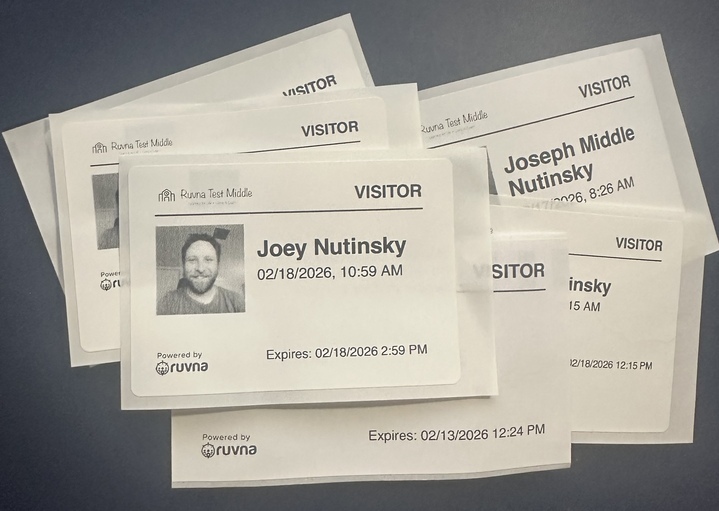
And unfortunately for us, when we launched Visitor Management at Ruvna, we needed to print visitor badges.
What follows is the story of how something that sounds simple — “print a badge” — turned into one of the most unexpectedly deep engineering journeys we’ve taken.
Chapter 1: The DYMO Era (a.k.a. "It Worked on My Machine")
When we launched Visitor Management, we needed visitors to get printed badges. Simple enough, right? We shipped our first version using DYMO's web service software. It worked! Kind of. With caveats. A lot of caveats.
The initial architecture looked like this:
- Define our badge layout in DYMO’s proprietary format
- Run DYMO’s Web Service software on the host computer
- Print from our web app to a DYMO printer connected to that computer
The setup required schools to run a proprietary DYMO background service on the host computer, use only DYMO-brand printers, and accept badge templates locked into DYMO's proprietary format. Oh, and it only worked from the web app on a computer physically connected to the printer — not from the iPad that visitors were actually signing in on. Minor detail.
Then DYMO released a software update that broke their own web service.
We found ourselves in the unenviable position of telling school administrators: "Okay, so you need to uninstall that update, then go to this archive page, download this specific older version…" You know you’re in trouble when your support doc includes the phrase “archived installer.” Even then, it was unreliable.
We needed a new plan.
Chapter 2: The Great PDF Rebuild
We needed to get off the DYMO dependency, fast. Our solution: skip the proprietary format entirely. Instead, we'd construct the badge as a PDF right in the web app, then trigger the operating system's native print dialog. Any printer. Any brand. Freedom.
It was a genuine improvement. Way more reliable. Way more compatible.
Two problems, though. First, it added an extra click — the staff member had to hit "Print" in the system dialog. Not the end of the world, but not the seamless experience we wanted.
Second — and this is a fun one — it turns out label printer manufacturers can't agree on label sizes. Our PDF was built to the dimensions of a DYMO label. Brother labels? Slightly different. So on a Brother printer, the badge would need to be scaled down, and it looked like a shrunken version of itself.
We shipped it anyway. Progress over perfection.
Chapter 3: The iPad Dream (a.k.a. "What If Visitors Could Just… Do It Themselves?")
Here's where it gets ambitious. Our vision: visitors walk up to a check-in station, tap through the sign-in flow on an iPad, and their badge prints automatically. No staff member needed. No computer. No extra clicks.
The UX bar for a visitor-facing kiosk is dramatically higher than for a staff tool. If a teacher has to fiddle with a print dialog, that's annoying but survivable. If a prospective family sees a loading spinner for 30 seconds and then nothing happens? That's a bad day for everyone.
We evaluated two paths: AirPrint (Apple's built-in printing protocol, works with tons of printers) or a proprietary printer SDK (tighter integration, fewer supported models).
AirPrint was the dream. Universal compatibility! We rebuilt the badge template engine again — this time server-side, generating the PDF via our API so the iPad could receive and print it. We got it working in the lab. We sent it to a few schools to test.
It did not go well.
AirPrint was slow. Not "hmm, that took a sec" slow. More like "is it broken?" slow. Worse, AirPrint gave us no way to query the print job status, so we couldn't even show the visitor a "Sending to printer…" message. They'd just stand there. Waiting. Wondering.
And remember the label size problem? AirPrint couldn't reliably detect what size label was loaded in the printer. So badges would come out either comically large (cropped on all sides) or comically small (a tiny badge island floating in a sea of white label). Not great for the "dead simple" experience we were going for.
Chapter 4: The Brother SDK
Back to the drawing board. But over months of printer wrangling, we'd noticed a pattern: Brother printers were just easier to deal with. More consistent. More predictable. Less... printer-y.
Brother has an iOS SDK. We tried it.
It was fast. Like, immediately fast. Hit print and the label is already coming out. The SDK also exposed printer status and per-label job tracking, which meant we could finally build real loading states and error handling. If the printer jams? We can tell the visitor. If it's out of labels? We can tell the visitor. Revolutionary stuff. (The bar is low in printer world.)
But there was a philosophical problem. We'd gone from supporting only DYMO → supporting any printer → and now we'd be back to supporting only Brother? That felt like moving backwards.
Chapter 5: Where We Are Now
So here's where our testing has landed: both.
The app is being built to support AirPrint and the Brother SDK. When a Brother printer is available, the app connects via the SDK for that fast, status-rich experience. When it's not, the app falls back to AirPrint for broader compatibility.
We're still in the develop-test-refine cycle on this one — it hasn't shipped yet, and there's more work to do before it does. Is it the most elegant architecture we've ever built? No. Is the AirPrint fallback experience as polished as the Brother path? Not yet. But this is what R&D looks like in the real world — you don't get to skip to the perfect solution. You earn it, one paper jam at a time.
The Scoreboard

What This Saga Really Taught Us
Badge printing seems small.
But in a school front office:
- A broken badge printer blocks visitors
- A confusing flow slows down check-in
- A missing badge is a safety issue
We don’t get to shrug and say, “Printers are hard.”
We have to make them feel easy.
And if you ever need help with your printer…
We probably can’t fix it.
But we definitely have opinions now.
We've rebuilt the badge template engine three times, evaluated two printing protocols, tested four integration approaches, and learned one universal truth: printers are the final boss of software engineering.
If you're a school that's been on this journey with us — thank you for your patience. Your badge printing is about to get a whole lot better.

Latest articles

What The First Six Weeks Of School Can Tell You That June Can't
The Drill That Teaches You the Most Isn't the One That Goes Perfectly